

The FDA Data Dashboard is FDA's free public website, at datadashboard.fda.gov, that lets anyone search, chart and export the agency's compliance and enforcement data: inspection classifications, Form 483 citations, warning letters, injunctions, seizures, recalls and import records. Most of its datasets refresh weekly, and every record carries the facility's FEI number, so one number links a facility across modules.
We checked the dashboard and its API documentation module by module on November 6, 2026, and set both against the Atlas inspection directory (release of August 15, 2026), so you can see which questions the dashboard answers and which it cannot.
- The FDA Data Dashboard has six compliance dashboards: Inspections, Compliance Actions, Recalls, Imports Summary, Import Refusals and Imports Entry.
- Inspections and citations appear only after FDA has finalized the classification of every project area in the inspection, so a recent inspection can be missing for months.
- Each citation row carries the CFR or Act section and FDA's standard short and long descriptions for that section; the investigator's written observation stays on the Form 483.
- The citations dataset has no investigator name field, and it leaves out citations from Form 483s that investigators prepared by hand.
- The Atlas directory (release of August 15, 2026) holds 75,762 Form 483s with observation detail, 4,996 investigator profiles and 228,446 site records.
What is on the FDA Data Dashboard?
The FDA Data Dashboard groups its data into six compliance dashboards plus a set of Food Safety Modernization Act (FSMA) lookups. Each dashboard has a Graphs view, a Data Tables view and a Download Dataset menu. The table lists what each one holds and how often FDA refreshes it, from the caveats printed on each page.
| Module | What it holds | Refresh | Coverage notes |
|---|---|---|---|
| Inspections | Final NAI, VAI or OAI classification per project area; Form 483 citations; a list of published 483s | Weekly | Excludes state, pre-approval, mammography and nonclinical lab inspections, and inspections awaiting enforcement action |
| Compliance Actions | Warning letters, injunctions and seizures | Weekly | Untitled letters, administrative actions and regulatory meetings are not included |
| Recalls | Recall events and products, Class I, II or III | Weekly | Only classified recalls, and only those classified on or after June 8, 2012 |
| Imports Summary | Import lines by product category and country: imported, examined, sampled, refused | Yearly | Final actions only |
| Import Refusals | Refused shipment lines by country, product and refusal charge | Weekly | Final actions only |
| Imports Entry | Entry lines released, refused or other, by country and port | Weekly | Graphs show 3 fiscal years; the data search starts at fiscal 2017 |
The FSMA side holds three lookups: LAAF Participants (laboratories in FDA's Laboratory Accreditation for Analyses of Foods program), TPP Participants (the Third-Party Certification Program list) and Approved VQIP Importers. Food importers use them; drug and device quality teams rarely need them. Two FDA pages with similar names live elsewhere: the FDA-TRACK food safety dashboard that reports FSMA progress, and the Inspections of Establishments Performance Dashboards, which publish yearly results such as FY25.
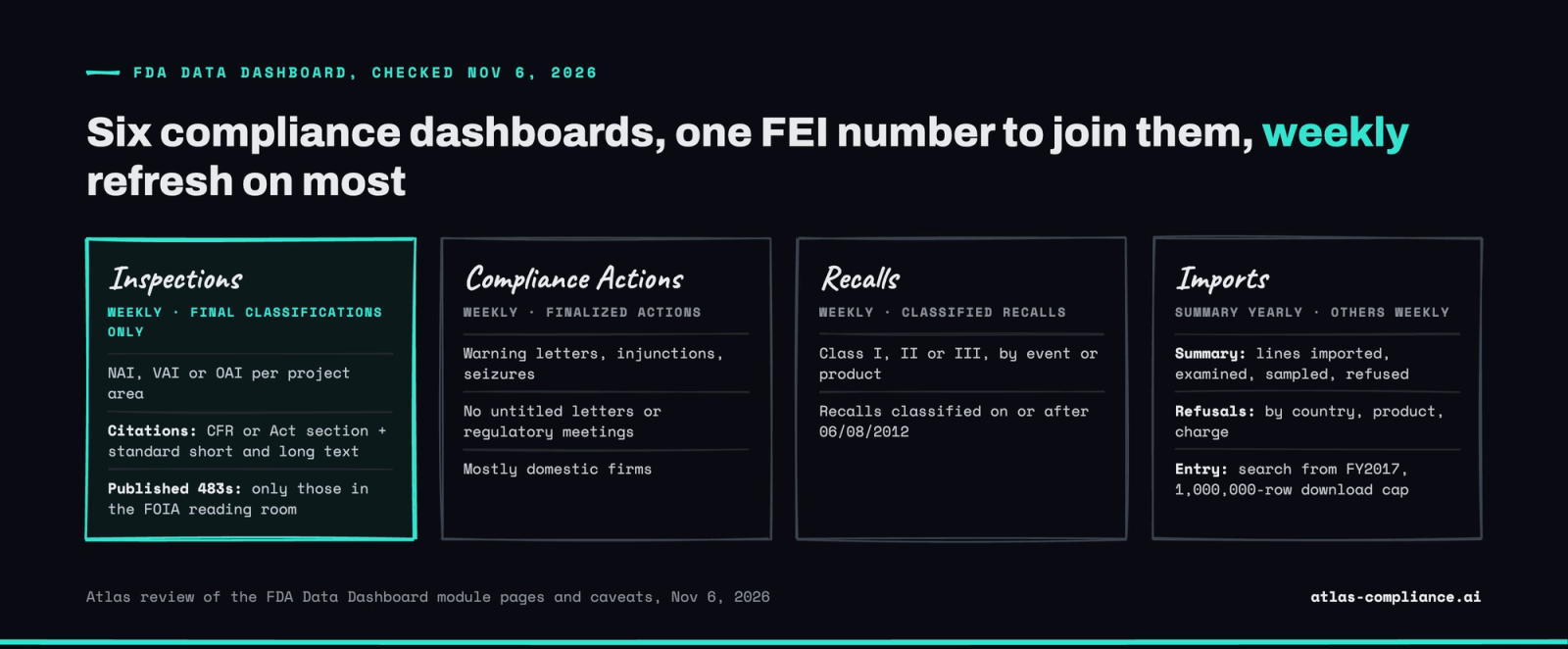
FDA counts by fiscal year, October 1 to September 30, on every graph. Dashboard totals and calendar-year figures, such as Atlas counts by issue year, can differ for that reason alone.
How do you look up a facility by FEI number on the FDA Data Dashboard?
To look up a facility on the FDA Data Dashboard, open the Inspections dashboard, type the facility's FEI number or legal name into the search box, select the matching value and confirm it with the green check mark. Every graph and table then narrows to that facility. The FEI (FDA Establishment Identifier) is the safer key, because one company name can cover dozens of FEIs.
- Open Compliance Dashboards, then Inspections. The graphs load the full dataset first.
- Search the FEI or firm name in the search box, or open Filters and pick values in the filter panes. Active selections show on the black selection bar.
- Click a classification (NAI, VAI or OAI), a product type or a fiscal year on any graph to narrow further. Selecting one fiscal year drills down to months.
- Switch to Data Tables and select one or more inspection IDs. The Inspections Citations Details table fills with the sections cited at those inspections.
- Run the same FEI through Compliance Actions, Recalls and Import Refusals to see whether the inspection led anywhere. The supplier check below covers each one.
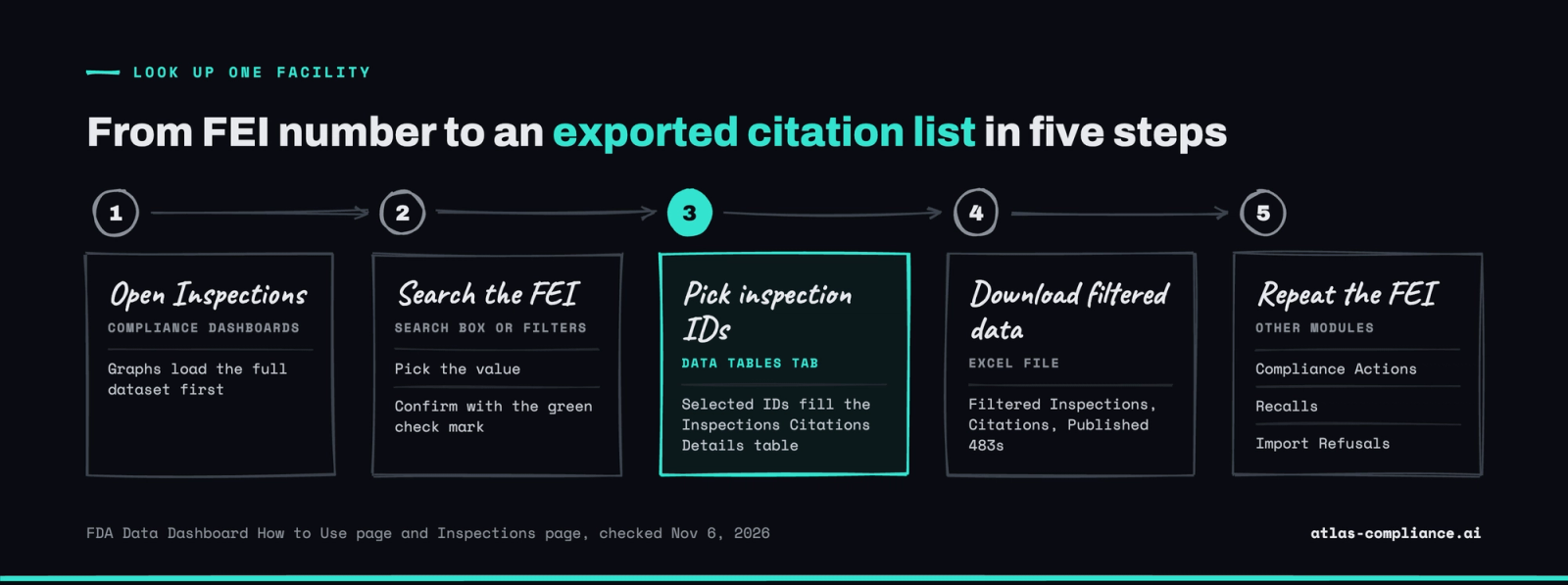
The classification you see is per project area, so one inspection can produce two or three rows. Our guide to NAI, VAI and OAI classifications explains what each one means and what follows an OAI.
How do you check a supplier's FDA compliance history on the Data Dashboard?
To check a supplier's FDA compliance history on the FDA Data Dashboard, get the facility's FEI number and run it through Inspections, Compliance Actions, Recalls and the imports dashboards. Note the date you ran the check, because a recent inspection can be missing until FDA finalizes its classification.
- Ask the supplier for the FEI of the facility that makes your material, or copy it from a Form 483 or warning letter.
- In Inspections, list each inspection end date, project area and classification. An OAI is the one to chase; Data Tables shows the sections cited at that inspection.
- In Compliance Actions, look for warning letters, injunctions or seizures on the same FEI, then read any letter on FDA's warning letter page.
- In Recalls, check for Class I, II or III recalls tied to the facility.
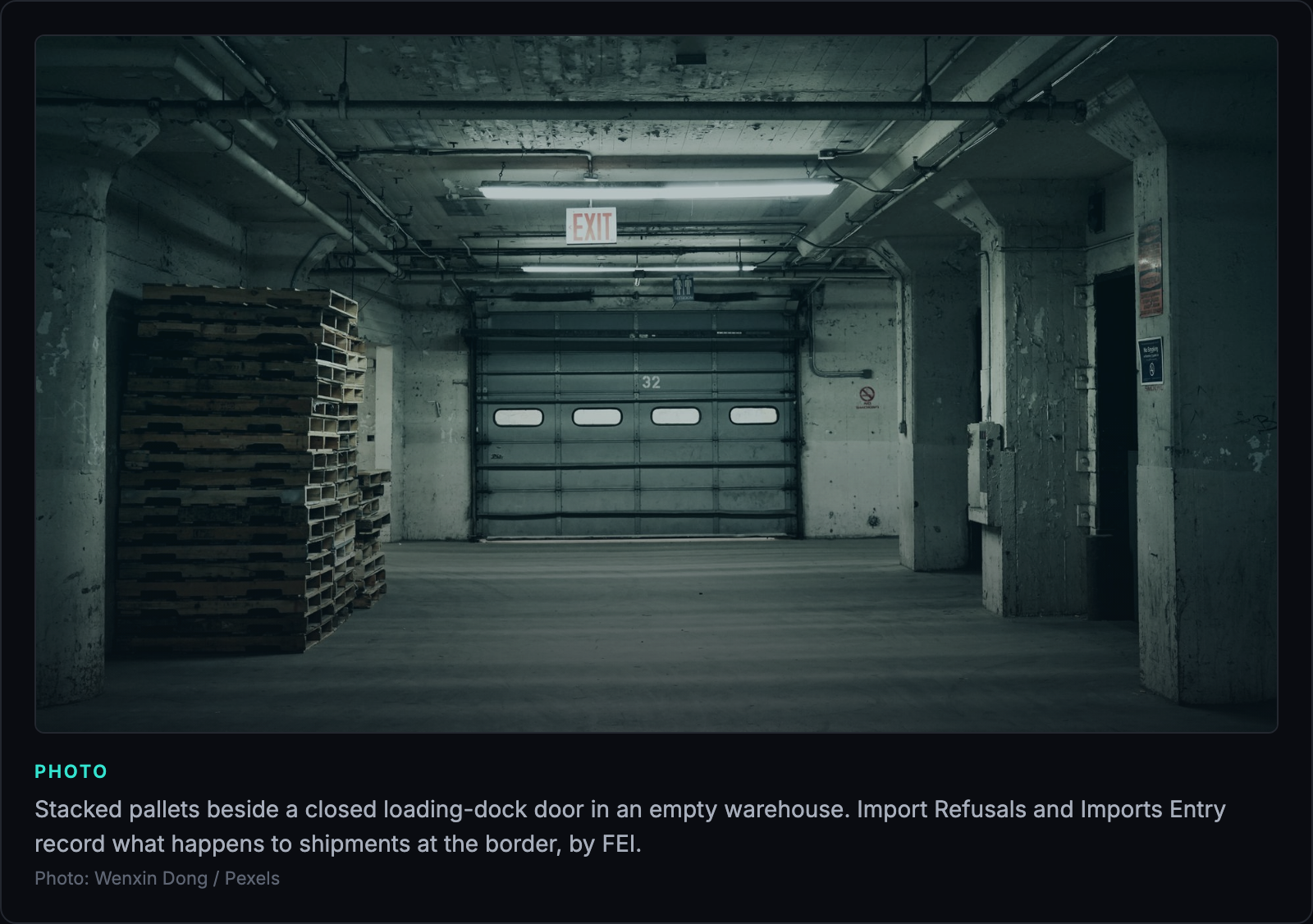
- For a foreign facility, open Import Refusals for refused lines and refusal charges, and Imports Entry for how its shipments were released or refused by port.
- For any cited section that matters to your material, read the written observation on the Form 483 itself, from the reading room or a 483 directory.
How do you export FDA Data Dashboard data?
You export FDA Data Dashboard data from the Download Dataset menu on each dashboard, as an Excel file. The menu offers the entire dataset or only the filtered data, and on the Inspections dashboard it covers three files: inspections, citations and published 483s. Changing a filter while a download runs cancels it.
Each graph also has its own Export button (image, PDF or the data behind the graph). The Imports Entry dashboard caps a single download at 1,000,000 records. For repeated pulls, use the API.

How do you use the FDA Data Dashboard API?
The FDA Data Dashboard API (DDAPI) is a REST service at api-datadashboard.fda.gov/v1 that returns the same datasets as the dashboard pages, in JSON. Every call is a POST with a JSON body and three headers, and one response holds at most 5,000 rows. FDA's OpenAPI file, ddapi.json, defines four endpoints; the documentation page we checked on November 6, 2026 lists a fifth for import entries.
| Endpoint | Dataset |
|---|---|
| /inspections_classifications | Inspection classifications (NAI, VAI, OAI) per project area |
| /inspections_citations | Form 483 citations by CFR or Act section |
| /compliance_actions | Warning letters, injunctions and seizures |
| /import_refusals | Refused import lines with refusal charges |
| /imports_entry | Import entry lines (on the documentation page, not yet in ddapi.json) |
- Request credentials through FDA's OII Unified Logon with a valid email, first name, last name and organization ("Self" or "Consumer" if you have none). FDA emails you an Authorization-Key, and your email becomes the Authorization-User.
- Send three headers on every call: Content-Type: application/json, Authorization-User and Authorization-Key. The client must use TLS 1.2, and a browser address bar will not work.
- Build the body. The keys columns, filters, sort and sortorder are required, though their values can be empty; start, rows and returntotalcount are optional. Any other key returns an error.
- Page through large results: start at 1, then add each response's resultcount to start until resultcount drops below your page size. Set returntotalcount to true on the first call to get totalrecordcount.
A minimal body for one facility's citations, posted to /inspections_citations with FDA's documented field names (the FEI is one from FDA's own documentation example; swap in your supplier's):
{"start": 1, "rows": 1000, "sort": "InspectionEndDate", "sortorder": "DESC", "filters": {"FEINumber": [3003570895]}, "columns": ["FEINumber", "LegalName", "InspectionID", "CitationID", "InspectionEndDate"]}
FEINumber, InspectionID and CitationID go in unquoted as numbers. Date filters take the field name plus From or To, for example InspectionEndDateFrom. The response body reports statuscode 400 with the message "Success." on a good call, 412 when nothing matches and 415 when rows exceeds 5,000.
How current is the FDA Data Dashboard?
The FDA Data Dashboard is updated weekly for most modules and yearly for Imports Summary. The longer delay comes from classification: FDA posts an inspection, and its citations, only when every project area classification in that inspection is final. A Form 483 handed over today shows up after FDA has reviewed the establishment inspection report, decided the classification and closed out any pending action.
The inspections dataset records the date FDA sent its classification letter in a field called FMD145Date, so you can measure the gap between inspection end and classification for any facility. Inspections that FDA holds back for a planned warning letter or other action stay off the dashboard until that action is taken. Records of those inspections may also stay closed to FOIA until FDA considers the matter closed under 21 CFR 20.64.
Recalls appear once FDA has classified them, and Compliance Actions lists only finalized actions. For a question such as whether a facility received a 483 last month, the dashboard is the wrong first stop.
What does the FDA Data Dashboard not show?
The FDA Data Dashboard does not show the written observations on a Form 483, the names of the investigators, or the 483 document itself for most inspections. FDA states several of these limits in the page caveats; others follow from the field list of the citations endpoint, which we checked against FDA's published API file on November 6, 2026.
- A citation row holds the section number, a short description and a long description. Both descriptions are FDA's standard wording for that citation, shared by every facility cited under it. The investigator's narrative, with batch numbers, dates and what the investigator saw, is on the Form 483 and in the EIR, not in the dataset.
- The citations endpoint returns 18 fields, including FEI, legal name, address, inspection end date, program area and CFR number. None names an investigator. Our US FDA investigator list explains where those names do appear.
- FDA notes that citations from manually prepared Form 483s do not appear, and that edits not synced back to its electronic inspection tools may leave the data out of step with the form the firm received.
- The Published 483s table lists only forms cleared and posted in FDA's FOIA electronic reading room. For the rest, you file a FOIA request. Our guide on how to access an FDA inspection report quickly covers that route.
- State contract inspections, pre-approval inspections and MDSAP audit reports are out. FDA removed MDSAP reports from the dashboard.
FDA Data Dashboard vs the 483 reading room, warning letter page and Atlas
The FDA Data Dashboard is the best free source for classifications and enforcement actions by FEI. The FOIA reading room is the source for a signed 483 PDF, the warning letter page for the letter text, and Atlas for observations, investigators and citation history across facilities.
| Source | What you get | Investigator names | Observation detail | Typical lag |
|---|---|---|---|---|
| FDA Data Dashboard | Classifications, 483 citations by section, warning letters, recalls, import refusals | No | Section number and FDA's standard wording | Posted after every project area classification is final |
| FDA FOIA electronic reading room | Selected Form 483s and EIRs as redacted PDFs | Yes, on the document | Full text, redacted | Whenever FDA clears and posts a document, often months |
| FDA warning letter page | The full letter: violations, inspection dates, response deadline | Rarely | The cited violations in the letter's words | Weeks: Baxter's letter dated September 29, 2026 was posted October 20 |
| Atlas directory | Every Form 483 on record with observations, CFR sections, investigators and facility history | Yes, linked to profiles | Each observation with its section; verbatim text and PDFs on request | Release cycle; the August 15, 2026 release runs to Form 483s issued July 20, 2026 |
For the warning letter route in detail, see our FDA warning letter database guide. For the three ways to get a 483, see where to find FDA 483 reports.
One facility read across sources: Unither Manufacturing, Rochester
Unither Manufacturing LLC in Rochester, New York shows what each source adds. The Atlas facility record (release of August 15, 2026) holds 12 FDA inspections, 8 of them ending in a Form 483, and 34 observations.
The dashboard would give you the inspection dates, the classifications once final, and each cited section with FDA's standard wording. Atlas lines the same sections up across forms. 21 CFR 211.67, equipment cleaning and maintenance, appears on six consecutive Form 483s at this facility: 211.67(a) in 2017, 2018, 2019 and 2021, then 211.67(b) in 2024 and 2026. 211.192, investigations of discrepancies, appears on four of them.
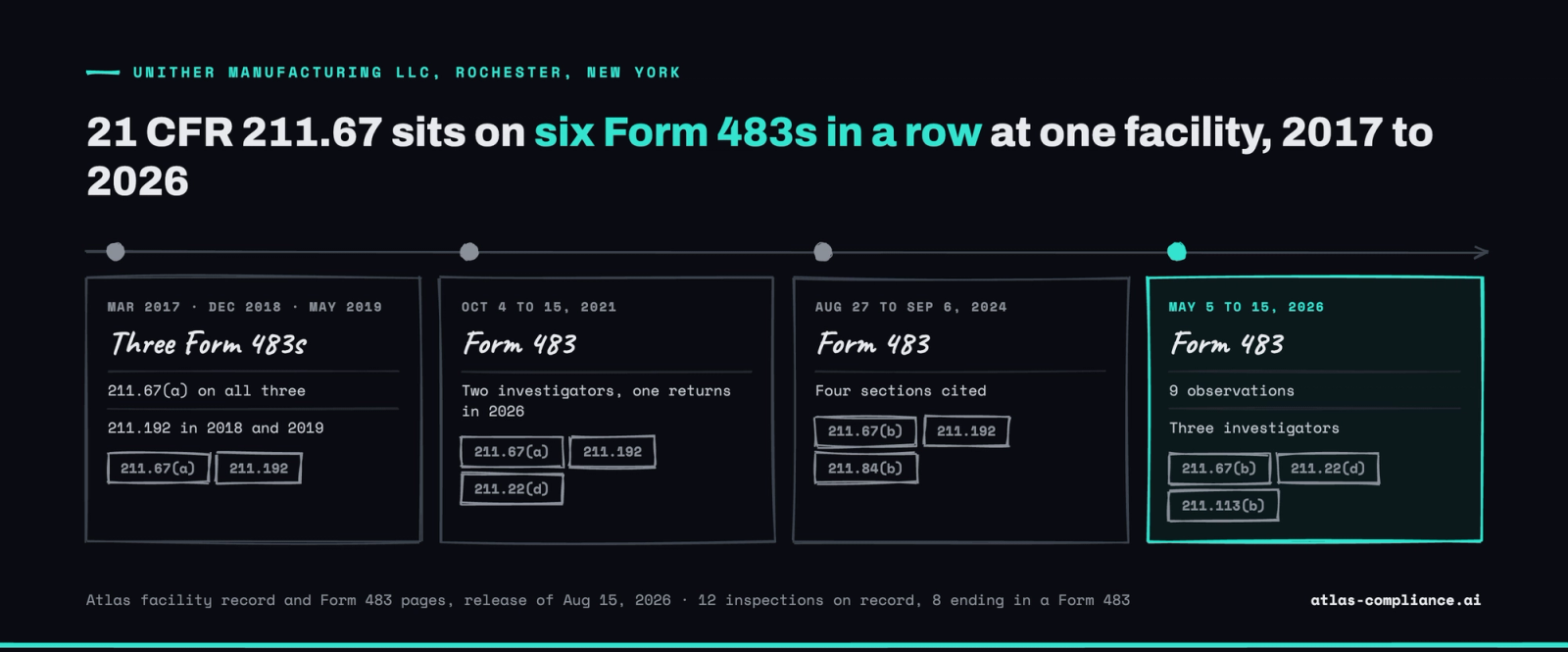
The May 15, 2026 Form 483 lists nine observations, from 211.113(b) on sterile drug procedures to 211.166(a) on the stability program, cited by three investigators. One of them, Syeda N Mahazabin, was also on the October 2021 inspection; her profile holds 52 inspections across 51 sites. Another, Young K Chou, has 14 inspections on record since August 2024. None of those names is in the dashboard's citation data.
Where does Atlas fill the gaps in FDA's data?
Atlas fills the three gaps the FDA Data Dashboard leaves: who cited a section, what each observation said, and how citations repeat across a facility's history and an investigator's record. The FDA Form 483 database (release of August 15, 2026) holds 75,762 Form 483s with observation detail, 4,996 investigator profiles and 228,446 site records.
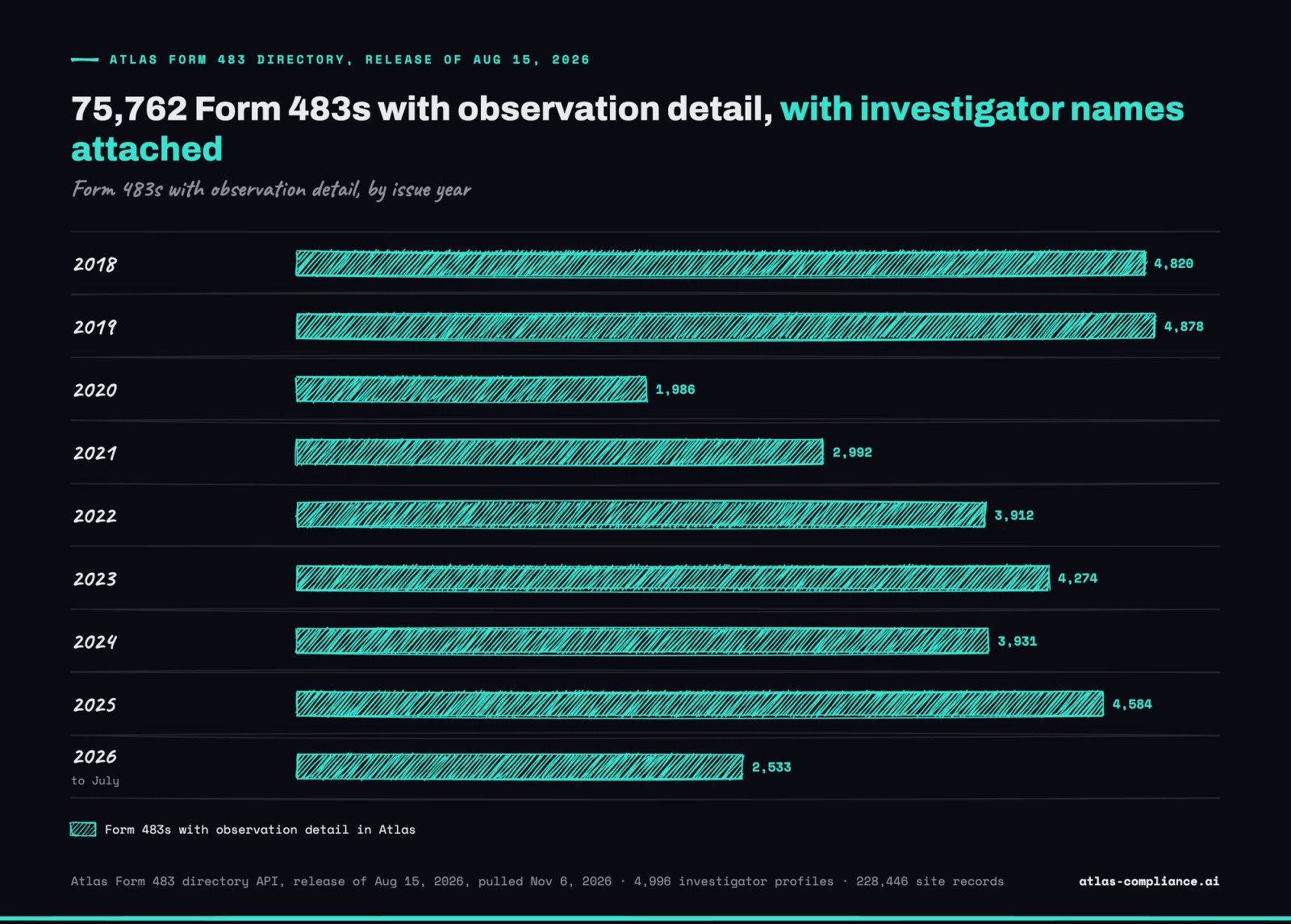
Volume tracks FDA's inspection activity: 4,820 forms in 2018, 1,986 in the pandemic year 2020, 4,584 in 2025 and 2,533 from January to July 2026. In a sample of 960 Form 483s issued in 2025, the median form carried 3 observations, the average was 1.32 investigators per form, and Atlas held the source PDF for 41%.
When you line citations up across forms, you see repeats that a single dashboard query hides. Across 90 recent human drug Form 483s in the same release, 211.22 (quality unit) and 211.160 (laboratory controls) each appear on 32% of forms and 211.192 on 31%. If one of those sections is on your last 483 and also on your expected investigator's recent forms, plan the follow-up evidence before the inspection opens.
 Atlas
See what the FDA knows about your next investigator.
30 minutes with the founder. No pitch deck.
Which source should you use for which question?
Use the FDA Data Dashboard when the question is about outcomes by FEI, and a directory or FOIA when it is about content or people. A short rule set:
- Supplier qualification: run the supplier walkthrough above on each FEI, then read the 483 observations and repeat sections in a directory.
- Inspection readiness: look up the investigator named on your Form 482 and the sections that person cites; the dashboard cannot tell you who is coming.
- A signed document for a submission, audit file or legal matter: check the reading room, then file a FOIA request.
- Trend counts by fiscal year, product type or country: the dashboard graphs and exports are the official FDA numbers to quote.
AtlasFDA Inspection Intelligence Digest
We track every 483, EIR, and warning letter the moment it happens. Get the signals before they hit the FDA website.
Frequently asked questions
Yes. The FDA Data Dashboard is free and needs no account to search, chart or download data from the website. Downloads come as Excel files, either the entire dataset or the filtered results. Only the API needs credentials: you request an authorization key through FDA's OII Unified Logon with your email, name and organization, then send it in the header of each request.

Written by
Bhavish Agarwal
Founder, Atlas
Bhavish Agarwal is the founder of Atlas and previously worked at Google and Microsoft. He has spent the past several years building regulatory data infrastructure for the pharmaceutical industry.